
save
SimpleMenu Known Issues
SimpleMenu Disappears
There following are a few of the main reasons why SimpleMenu disappears.
Pop-up Windows
By default, SimpleMenu wants to hide itself in pop-up windows. This is a feature.
The reason is that many websites will open pop-up windows for all kinds of extra-features such as uploading an image or printing some description of an image or the definition of a word or product.
These windows should not include the SimpleMenu bar.
There is a dedicated page giving several different ways to fix this problem on your website.
Menu Overflow
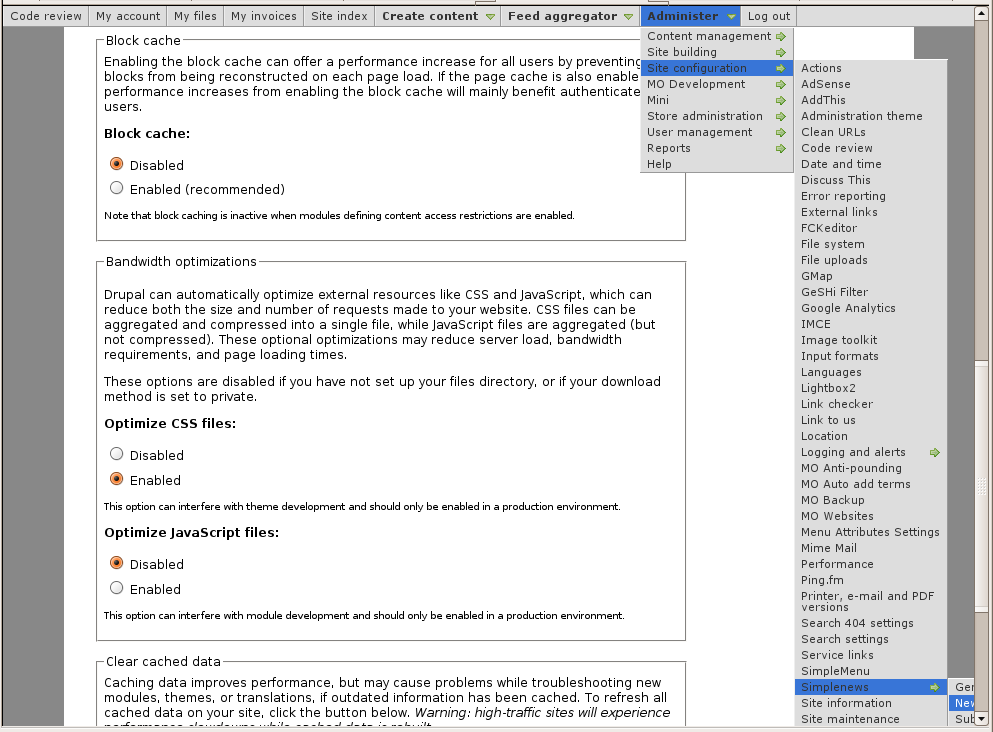 Very long menus will disappear on the
Help for To Do List End Users
Introduction
 This page documents the usage of the To Do List module to end users (i.e. not how to install and setup the module, but how to create To Do List items, share them, mark them started/finished, etc.)
For administrative information check out the To Do List module help.
To Do List Global Settings
Global Settings
Global settings are found under Administer » Site configuration » To do list (admin/settings/to_do).
Only To Do List administrators can edit the Global Settings.
How do I create a menu entry with Drupal?
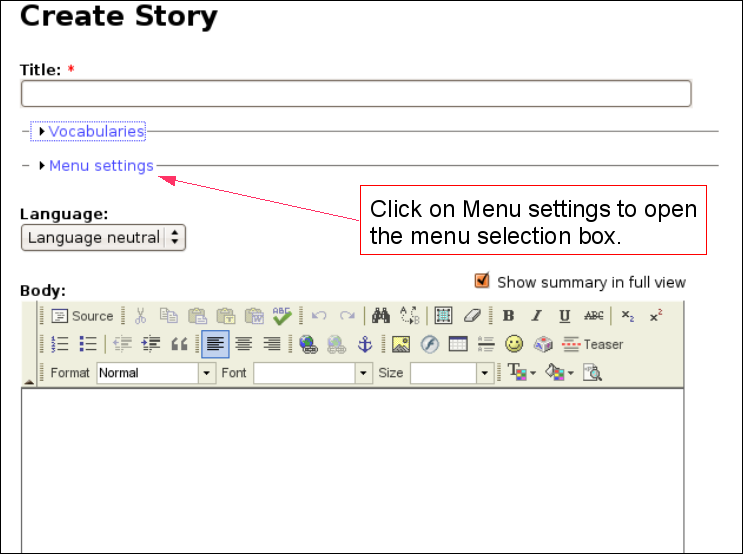 Pages and menus are separate modules in Drupal.
How do I add my Facebook badge to my Blogger page?
Wed, 04/14/2010 - 04:17 — Alexis WilkeWhen I created my blog on Blogger, I felt like it was a bit dry at first. So I looked into what to add in the column on the side... Since I like to make friends on Facebook, I thought that adding my badge would be a good idea.
It is quick to do and everyone can do it, really! So... first log in both Blogger and Facebook. In Facebook, go to your wall and click on Edit My Profile. The link is under your picture (and I hope you uploaded a photo! People want to see your face!!! Not your dog or your car.)
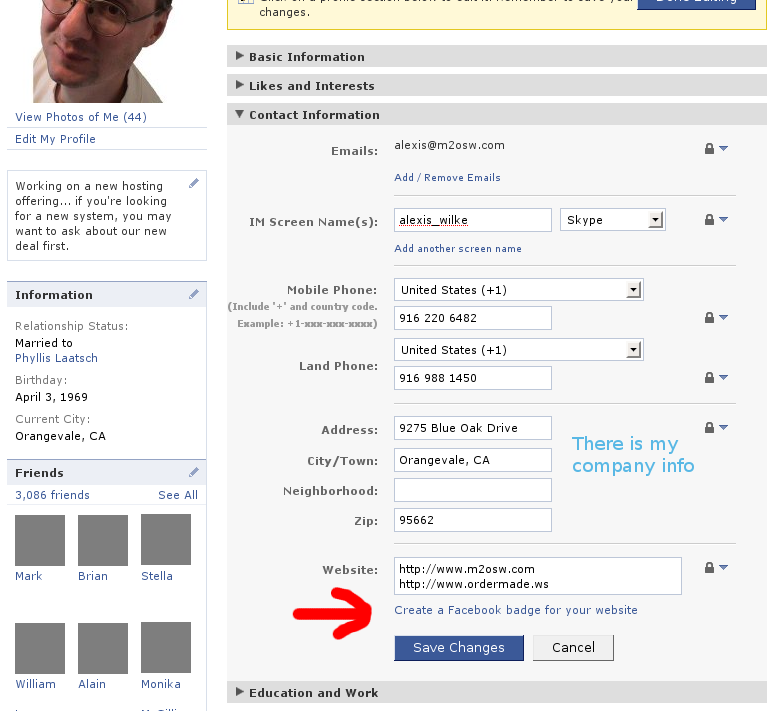
Once in your profile, click on the Contact Information bar. Then click on the ...
Discuss This! module Known Issues
The module works and is secure, however, there are problems difficult to circumvent. The following lists them. If you can help fixing some them, you'll be more than welcome!
Reordering the Comments on your Node
It is possible to reorder the node fields using the CCK module. If the Discuss This! comments do not appear exactly where you'd expect them to be, try using the the CCK module:
- Download the CCK module
- Install the CCK module
- Go to Administer » Content management » Content types
- Click on Manage content fields next to the node type you are ...
Insert Nodes used as a macro (6.x-1.2)
This module can be used to create macros (as pointed out by one of our user in a Drupal issue.)
The following steps show you how you can create a macro with the Insert Node module.
Create the Macro
First, create a node that is to become the macro. We will call this node macro. It is used without the Insert Node filter so the Insert Node tags do not get changed. This is important since we reference the main node (with the asterisk) and that reference would look like a recursive reference.
One idea is to use the macro as a PayPal button which gets set with parameters from another node. ...
Coming back at the right place when adding/editing/deleting Comments
It is now possible (See #418004: Comments included --> Back after reply) to have Drupal send you back to the page that inserts the node instead of the inserted node. Say you create node A and B. You include node A inside node B. You are looking at node B now. You decide to add a comment on node A (that you see from within node B.) Click on the Add new comment link, write the comment and click Save. At that point, you probably want to come back to node B instead of node A.
This feature is only necessary if you have the links at the bottom of the node and allow comments to show up.
The ...
Upgrading from version 1.0/1.1 to 1.2 or newer (or -dev) for Drupal 6.x users
I changed the name of the module back to InsertNode (although I did not want to, I did not want to jeopardize the Drupal 5 version... which would probably have been fine, but well...)
So, the newer version of the D6 module is again called InsertNode.
To upgrade you will want to keep the other version running until you get the new version as the replacement (although you can manage your site the way you'd like this procedure let you switch from the previous version to the new version without having to turn off your site for a little while.)
- Extract the new version, it adds InsertNode ...
Declare Dictionary
Declare an array of strings that will later be retrieved using the Push Data action with a dictionary lookup. There can be a maximum of 65534 strings. The visibility of a dictionary is within its DoAction or other similar block of actions. Note that you should have only one Declare Dictionary. The dictionary is visible from everywhere in the DoAction. In other words, you can access it from functions1, With blocks, try/catch/finally blocks, etc.
When multiple Declare Dictionary actions are used, ...
- 1. Declare Function and Declare Function 2 both accept accesses to Declare Dictionary.
